How to log in to Gal Sport Betting
Log in to GSB Zambia with the mobile number linked to your account and your password. If access fails, the useful next step depends on the message: a wrong password, an unfinished activation, a missing recovery SMS and a suspended account need different responses. Use the matching route below.
GSB login steps
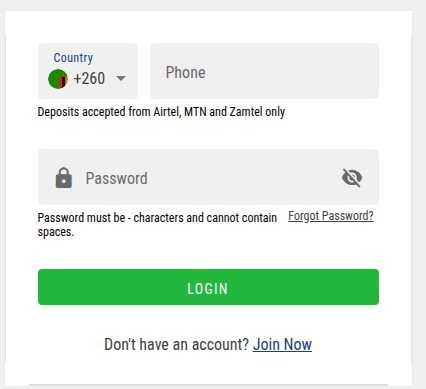
- Open GSB with the login button below and choose Login.
- Check the country selector and enter your registered number in the displayed format.
- Enter the account password, checking pasted spaces and accidental capitals.
- Submit once and wait for the account to open.
- Check the profile and account details before starting a payment.
The Zambia form supplies a +260 selector. Use the phone-format example in the field and avoid repeating the country code. If you keep several SIMs, use the number originally linked to GSB, not simply the SIM currently providing mobile data.
Forgot your password? Use the recovery link
- Select Forgot Password from the GSB login form.
- Provide the registered number requested by the recovery screen.
- Wait for the five-digit SMS recovery code.
- Enter that code in the recovery form.
- Create the new password, confirm it and save.
- Return to Login and use the new password.
Update any saved password after the reset. A browser or password manager may still insert the old value, making a successful reset look as though it failed. Inspect the entry on your own screen and type the new value manually once if needed.
The reset SMS does not arrive
First establish whether the destination is correct and still accessible. Check the number on the recovery screen, then test ordinary SMS on that SIM. On a dual-SIM phone, confirm which line receives account messages. Keep the recovery form open and wait until resend is available.
If you have made several requests, identify which message belongs to the current one. A registration activation code and a password-reset code are not interchangeable. If a code is rejected, request a fresh one when allowed and keep the exact rejection message for support.
📌 Some advice
Tell support whether this is activation or password recovery. Both use SMS, but they are different account actions and need different checks.
My password is right but login still fails
Check the number before changing the password again
A correct password for a different registered number will not identify the right account. Compare the number with your original registration messages. Check whether an old password manager entry belongs to a different national service or a previous login address.
Finish an incomplete activation
If the account was created recently and you never completed the confirmation SMS, tell GSB that you need activation assistance. Ask them to check whether the account exists and what remains unfinished. Repeated password resets do not explain an uncompleted signup.
Separate a page problem from an account problem
If the form is blank or the button never reacts, try a current browser outside an in-app window. Check that JavaScript and the page’s required cookies are allowed. If only one browser fails, clear that site’s stored data after saving any needed account information. This signs you out and may require a fresh login.
If the same account is refused in both the app and browser, record the exact message. A display that says suspended or restricted needs an account-status answer from support. A browser refresh cannot establish why a restriction exists.
Lost SIM, changed number or suspended account
For a lost SIM, ask your network about restoring your own number and contact GSB about recovery. If the number has changed, explain which contact method you still control. GSB may request identity evidence through its verification process before changing access details.
A suspension or ownership review is different from a forgotten password. Ask which check or document remains outstanding and retain the case reference. If the account was closed under a responsible-play restriction, ask about its status through support; do not try to access another account to get around it.
Change the password while already signed in
Open the user menu, choose Edit Profile and then Change Password. Enter the current password and the new password twice where requested, then save. This is the account-settings route for someone who still has access. Forgot Password is the recovery route when you cannot sign in.
Send GSB a useful access report
GSB lists 24/7 support and the call/WhatsApp number 0977 560 501. Describe the error, whether it occurs in the app or browser, when access last worked and whether the SIM receives SMS. Provide account identifiers privately through verified support. Keep passwords, OTPs and recovery links out of the message.
Example: “My Zambia account worked yesterday. Today the login form shows [exact message]. Forgot Password sends no SMS, although the SIM receives ordinary texts. I last requested a code at [time]. Can you check activation, recovery delivery and account status?”
Once access returns
Review your profile and payment history, update the saved password and sign out of shared devices. Use the GSB registration guide only if you do not already have an account. Our GSB review and MTN MoMo walkthrough cover the next account tasks.
Logging in on the GSB app
GSB’s Android app is downloaded as an APK from GSB’s own site, and you log in with the same number and password as on the website. There’s no iPhone app, so iPhone users log in on the mobile site. Deposits on both are approved through a USSD prompt, which works even on a weak connection.
Once you’re logged in
- Deposit with Airtel, MTN or Zamtel from K1 to K20,000.
- Withdraw from K1 to K20,000, confirming with your password.
- My Profile shows your Player ID, which you need to pay cash in at a GSB shop.
More guides
GSB login FAQs
📱 Can I use a new SIM to log in?
Use the number linked to the account. A new data SIM does not automatically become the registered GSB number.
🔢 Is an activation SMS the same as a reset code?
No. Match the code to the action you requested and the screen currently open.
🔒 Will resetting a password unlock a suspended account?
It changes the password. Ask support about the restriction and any required verification separately.
📝 What should I save after a support chat?
Keep the case reference, instructions and the date. Follow up in the same case so the history remains clear.