How to register at Gal Sport Betting
GSB Zambia registration starts with your mobile number and a password. This guide takes you through the form, phone activation and the problems that can stop Join Now working. It also explains how to handle a number already linked to an account, so you can reach the right account before making a payment.
Before opening the GSB registration form
Have your own Zambian mobile number available, with access to its SMS messages. Keep your NRC or other requested identity document ready for profile checks. Use details that match your wallet registration and choose a password saved securely on your own device. Registration is for adults aged 18 and over.
There are two separate stages to keep in mind: creating the login and completing any later identity checks. Getting past the signup form does not mean every withdrawal check has already been completed. Finish the personal profile while your documents are close to hand.
How to register at GSB, step by step
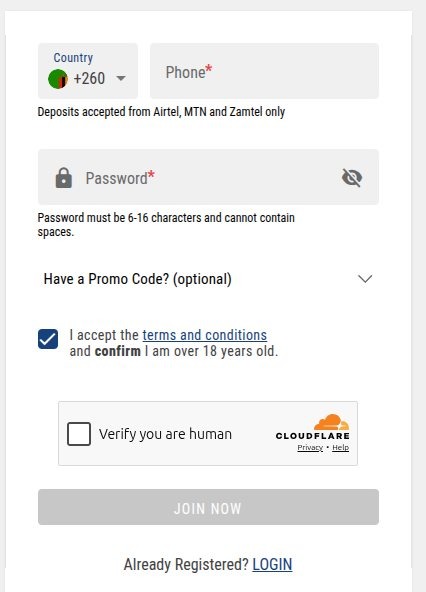
- Open GSB through the button below and select Register or Join.
- Check that Zambia’s +260 prefix is selected. Enter the remaining phone digits in the format requested by the field.
- Create your password. Follow the length and character instructions beside the current form.
- Add a promo code only if you have a valid one you intend to use.
- Review the terms, confirm your age and complete any human-verification check.
- Submit Join Now. If an activation screen appears, enter the SMS code sent to your number.
- Open your profile and complete the requested personal details accurately.
A password containing at least eight letters and numbers is a useful starting choice, provided it meets the current form’s displayed maximum. Check for an accidental space when pasting. Use the eye icon, on your own screen, to inspect the entry before submitting.
GSB’s five-digit verification code
GSB’s welcome walkthrough uses a five-digit SMS code to activate the account. Leave the activation screen open while checking your messages. Return to the same screen and enter the code into its confirmation field. Activation codes and password-recovery codes belong to different actions: use the message for the action you just requested.
The SMS has not arrived
- Check the number on the form, including whether +260 was already supplied separately.
- Confirm that the SIM can receive ordinary SMS and that the correct SIM is active on a dual-SIM phone.
- Wait for the resend control to become available before requesting another code.
- Check blocked or filtered messages. If several requests were made, use the message for the current request.
- Record the error and time of the last request if you need support.
📌 Some advice
Keep the activation tab open. Switching to a fresh registration form can make it harder to tell whether you are activating an existing attempt or starting another one.
Why is Join Now grey or unresponsive?
Work down the form and look for the first unfinished requirement. A missing consent box, invalid phone entry or incomplete human-verification check can leave the submission control unavailable. Correct the highlighted field before refreshing. If you refresh, check whether the verification widget needs completing again.
For a widget that does not load, try a current browser with JavaScript enabled. Temporarily pause a content blocker for this page if it is hiding the widget. Test the normal browser outside an in-app social-media window. These are browser checks to try; they do not establish that the account has been blocked.
My number is already registered
Move to Login and use Forgot Password for that number. A recycled SIM, an older signup or an account you have forgotten can lead to this message. GSB allows one betting account per customer, so creating another profile is not the right way to resolve it.
If you recently acquired the number and have never held the associated account, tell support that clearly. Ask them to check ownership and the registration record. Do not try to access someone else’s profile or send a deposit to an account whose ownership is unresolved.
Wrong number or incorrect profile details
Before submitting, go back and correct the field. After an account exists, check the profile’s editable fields and contact GSB for details you cannot change. Give the correct spelling and explain which field is wrong. Submit documents only through a verified support or account-verification route.
If you no longer control the registered SIM, arrange a SIM replacement with your mobile network when possible and ask GSB about account recovery. Opening a second account can create a duplicate-account problem without recovering the original balance.
After signup: check the account before funding it
- Save the account details securely and check that the registered number is yours.
- Complete requested profile information using your ID spelling.
- Review the welcome offer available in the account before activating it.
- Use your own wallet for payments and keep transaction references.
Continue with our GSB login and password-recovery guide, Airtel Money deposit walkthrough or GSB bonus guide.
When to contact GSB
GSB’s support channels include 24/7 chat and the Zambian call/WhatsApp number 0977 560 501. For signup trouble, describe the exact message, your device/browser, whether the number receives SMS and what you have already tried. Keep the same conversation reference when following up. Never include a password or OTP in a support message.
Making your first deposit
Once you’re in, open the Deposit menu, choose Airtel Money, MTN MoMo or Zamtel Money, enter an amount from K1 to K20,000 and approve the USSD prompt on your phone with your PIN. The money lands in your balance immediately, less the 5% betting levy.
You can also pay cash in at any GSB shop using your Player ID, which you’ll find in My Profile.
More guides
GSB registration FAQs
📱 Should I enter +260 twice?
Use the country prefix once. When +260 is already a separate selector, follow the remaining-number example shown in the phone field.
🔢 What if my activation code is rejected?
Check that it is the code for the current activation request. Use a fresh resend when available if the original has expired. Report a repeated rejection with the time and exact message.
🎁 Is the promo-code field compulsory?
The photographed form labels it optional. Enter a code only when you have a valid offer you want, then check its conditions before depositing.
🔐 I already have an account. Should I register again?
Use Login and account recovery. GSB’s single-account rule makes recovery the appropriate route for a forgotten signup.