How to register at 1xBet Zambia
Registering with 1xBet Zambia involves more than choosing a password: you select a signup method, country, currency and offer, then receive an account ID. This guide explains those choices and how to fix a missing SMS, an already-used number or a one-click account whose details were not saved.
Choose the signup method you can recover later
The Zambia registration page offers phone, email and social/messenger options, with one-click registration also described in its signup guidance. Use a method whose contact details you control. Phone signup is convenient when you expect to use your Zambian SIM for account messages and wallet payments.
- Phone: have the SIM available to receive the confirmation message.
- Email: use an inbox you can open and keep secure.
- One-click: save the generated account ID and password immediately.
- Social or messenger: use the same linked provider when returning to the account.
Before proceeding, choose Zambia and ZMW where offered. The account currency affects how stakes and balances are displayed. Review it before submitting, particularly if a link opened an international form.
Register by phone, step by step
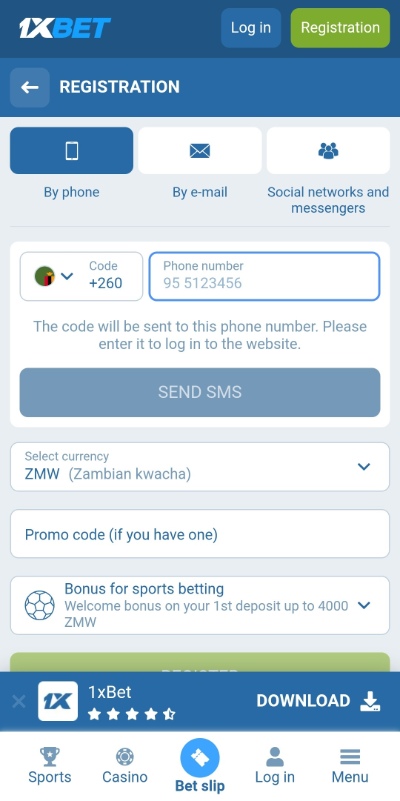
- Open 1xBet from the registration button and select Registration.
- Choose By phone and check the +260 country code.
- Enter the phone digits using the field’s displayed format.
- Request the SMS and enter its confirmation code.
- Select ZMW and review the welcome-offer choice.
- Enter a promo code if you have a valid one you want to use.
- Read the account terms and submit the completed form.
- Save your account ID and complete the personal profile.
The number and the account ID have different jobs
1xBet assigns an ID after account creation. It identifies the betting account; the phone number identifies a contact route. Once properly linked, phone or email can also be login options. An ID is useful when a phone-based login fails because it helps you establish which account you are trying to open.
Save the ID privately in your password manager alongside the account password. Keep a separate record of which number or email is linked. If you used one-click signup, complete these links before leaving the session: recovery is harder when all you have is a lost screen of generated credentials.
📌 Some advice
After signup, check that you can identify the account and reach its linked contact method. Keep the current session open until you have safely saved the ID and completed the profile.
Registration problems and the next useful check
The SMS code does not arrive
Check the country selector and number, then confirm the SIM can receive ordinary texts. Keep the registration tab open and use its resend control when available. If several codes arrive, match the message to your current request. Avoid starting several signup windows at once.
If delivery still fails, tell Zambia support which number format you used, when you requested the message and whether other SMS arrives. Do not send the OTP itself. A missing code is not proof that another signup method will attach to the same account.
The phone number or email is already registered
Try login or recovery for the existing account you own. A failed-looking signup may already have created an account. If it is a recycled SIM and you do not own the previous profile, explain this to support and ask for an ownership check. Do not use another person’s account.
The form will not load or submit
Check the first highlighted field, required consent and any verification widget. If the form is incomplete, reload once or try a current browser outside a social-media in-app window. After a submission error, check your messages for account details before repeating registration.
I chose the wrong currency or country
Correct it before submitting. If an account already exists, ask support which correction is possible on that account. Do not assume a currency setting can be changed or create a second account to repair the first one. Include the assigned ID so the agent can inspect the right record.
I forgot the promo code
Check the selected offer and its terms inside the account. Ask support about the existing account before making a deposit if the code was important to your choice. Code acceptance and a qualifying deposit are separate parts of an offer; entering a code does not mean every bonus requirement is complete.
Complete the profile and prepare verification
Add your personal details using the spelling on your ID. Check the number, email and address carefully. If requested to verify ownership, use the official account or security process and follow the exact document instructions. A clear image with the requested information visible is more useful than repeatedly sending a different document.
Keep the request reference and ask which requirement remains if an upload is rejected. Do not send passwords, OTPs or full document images to someone who contacts you through an unverified social account. A support request should identify the problem before you provide sensitive evidence through the approved route.
Get help from 1xBet Zambia
The Zambia contact page lists 8180 for customer support, support-en@1xbet.co.zm for general or technical issues, and security-en@1xbet.co.zm for security matters. Registration and SMS failures belong with general support; suspected unauthorised access needs the security route. Keep the account ID in the correspondence if one has been assigned.
Next, use our 1xBet login and recovery guide. The Airtel Money guide and Zamtel deposit guide cover payments, while the main review covers the product itself.
Making your first deposit
Tap Deposit, choose your mobile money wallet and approve the prompt on your phone with your PIN. 1xBet also takes cards, e-wallets and crypto, and you can pay in at 1xBet shops.
More guides
1xBet registration FAQs
🆔 What if I closed the one-click details screen?
If you remain logged in, save the ID from the account and link your own contact details. If access has already been lost, use a linked recovery method or ask Zambia support to investigate ownership.
📱 Can I use the same account in the app?
Yes. Use the credentials for the account you created. The app and browser are access routes to the same account.
💱 Which currency should a Zambia account use?
Select ZMW if you want your account displayed in Zambian kwacha. Check this choice before submitting registration.
🔄 Should I register again after an error?
First check for confirmation and try recovery for the details you entered. Ask support whether the account exists if its status is unclear.