How to log in to 1xBet Zambia
1xBet Zambia lets you sign in with an account ID, linked email or linked phone number. Choosing the matching login method is the first useful check when a password appears to fail. Below are the recovery routes for forgotten details, missing codes, account restrictions and app-only problems.
Choose the login method that matches your account
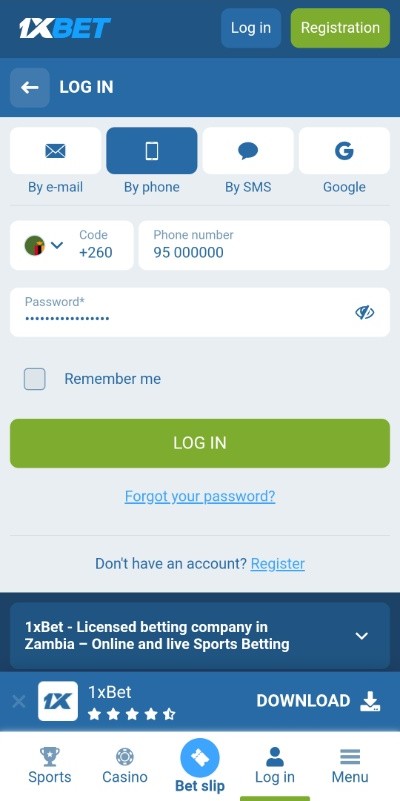
An account ID is the identifier 1xBet assigned when you registered. It is different from the phone number or email linked later. Choose the appropriate method before typing: a phone number in an email/ID field may not be interpreted as the phone-login route.
- Open the Zambia service using the login button.
- Choose the phone, email/ID or linked-provider method you normally use.
- Enter the matching identifier and account password.
- Submit once and complete any additional confirmation requested.
- Check the account ID and profile after signing in.
Forgot the password
Select the recovery control on the login form and choose an available linked contact method. Request the message to the email or phone actually attached to the account. Follow that message and the recovery screen to set the new password, then update any saved browser entry.
The login identifier and recovery destination can be different. Knowing an ID helps support find a record, but it does not mean you can receive its reset code. If you no longer have the linked contact, tell support this explicitly and ask about ownership recovery.
Forgot the ID or lost one-click credentials
Try a phone or email method already linked to the same account. If a session is still open on another device, keep it open while saving the ID from the account and checking the recovery contact. Do not start a new one-click registration while trying to find the earlier profile.
If no contact was linked and every session is closed, ask Zambia support to investigate the existing account. Give the approximate registration date and any account correspondence you still have through a verified channel. Do not guess ownership evidence or attempt to enter another person’s profile.
📌 Some advice
A screenshot of an old account screen can help you locate your own ID privately. Redact it before sharing publicly and keep passwords and security codes out of support screenshots.
Correct password, wrong login route
Phone login
Use the linked number and check whether +260 is supplied separately. Follow the field’s example for the remaining digits. The number currently providing your phone’s data is not necessarily the number attached to the betting account.
Email or account-ID login
Check the exact linked email or numeric ID. An unrelated inbox will not identify the account. After a reset, inspect autofill: a saved old password can be reinserted even though you have typed a new one elsewhere.
Social or messenger signup
Use the same provider and identity used at registration. If a provider opens a fresh registration screen, stop and check which social account is signed in. Starting another signup does not establish that you have recovered the original profile.
Recovery SMS or email is missing
- Check the destination for a typing error or an old contact.
- Test normal SMS reception or sign in to the email inbox directly.
- Check filtered messages and the active SIM.
- Keep one recovery screen open and wait for its resend option.
- Use the code or link for the current request.
If both available recovery methods fail, record their exact outcomes and contact support. A delayed code, incorrect contact and restricted account are different possibilities; the message and account record determine which route applies. Avoid promising yourself that repeated resets will unlock a restriction.
Temporarily blocked, restricted or verification required
Stop cycling through passwords if the page explicitly describes an account restriction. Ask which department is reviewing access and which action is required. A password change does not itself complete an identity review or remove an account-status restriction.
The Zambia contacts distinguish general/technical support from security enquiries. Use support-en@1xbet.co.zm or 8180 for the initial problem; use security-en@1xbet.co.zm for security matters or follow the department named in an existing verified case. Keep the ID and case reference consistent.
If documents are requested, follow the specified format and submission route. Ask what remains missing when a document is rejected. Do not send a password, OTP or withdrawal code as proof of ownership.
The website works but the app logs me out
Check that the app is current and that it opens the same Zambia account. Try one deliberate login in the normal browser to distinguish a local app problem from an account-wide refusal. Save recovery access before clearing local data or reinstalling.
If a blank form or button affects only one browser, check JavaScript, cookies and content blockers for that site. Clearing that site’s stored data may help a stale session, but will sign you out. A country-access message needs a service-availability answer from official support; do not enter credentials into a random replacement link.
Send a precise report
Include your ID privately, exact message, time, device/app version, last successful login and whether email/SMS recovery arrives. Say which checks already worked or failed. Follow up in the same case so the agent can see the history.
For first-time setup, use the 1xBet registration guide. For account use after recovery, see the main review and Airtel Money deposit walkthrough.
Logging in on the 1xBet apps
1xBet’s Android app is downloaded as an APK file from its site, and its iPhone app is on the App Store. You log in with the same details as on the website. On your own phone you can stay logged in, but log out if anyone else uses it.
Once you’re logged in
Deposit with mobile money, cards, e-wallets or crypto, or at a 1xBet shop. Withdrawals go back to the method you deposited with, and 1xBet may ask for ID before your first payout.
More guides
1xBet login FAQs
🆔 Is the account ID my mobile number?
No. The assigned ID identifies the betting account. A linked phone number is a separate contact and possible login method.
📨 Can I receive a reset with only the ID?
Use a recovery method actually linked to the account. If neither contact is accessible, ask support about ownership recovery.
🔄 Should I create another account if login fails?
Recover the existing account. A new registration does not restore its balance, tickets or verification history.
🔒 Why does access still fail after a reset?
Check the chosen login method, autofill and exact error. A restriction or additional verification step requires its own resolution.