Melbet Zambia Registration: Choose ZMW, Save Your ID & Complete Setup
Melbet offers phone, email, one-click and linked-account registration. For a Zambia account, the useful checks are the country code, ZMW currency, recovery contact and welcome-offer choice. This guide explains what to save after signup and what to do when confirmation, profile completion or account recovery gets stuck.
Choose a registration method with recovery in mind
Phone registration suits a player who keeps their own Zambian SIM active. Email registration gives you an inbox-based confirmation route. One-click signup creates credentials quickly, but saving those credentials and adding contact details become your immediate next tasks. A linked social account depends on continued access to that provider.
Have your own ID details available for the profile and any verification request. Register with accurate information and use a payment account in your own name. Account creation, contact confirmation and later identity verification are different steps.
How to register a Melbet Zambia account
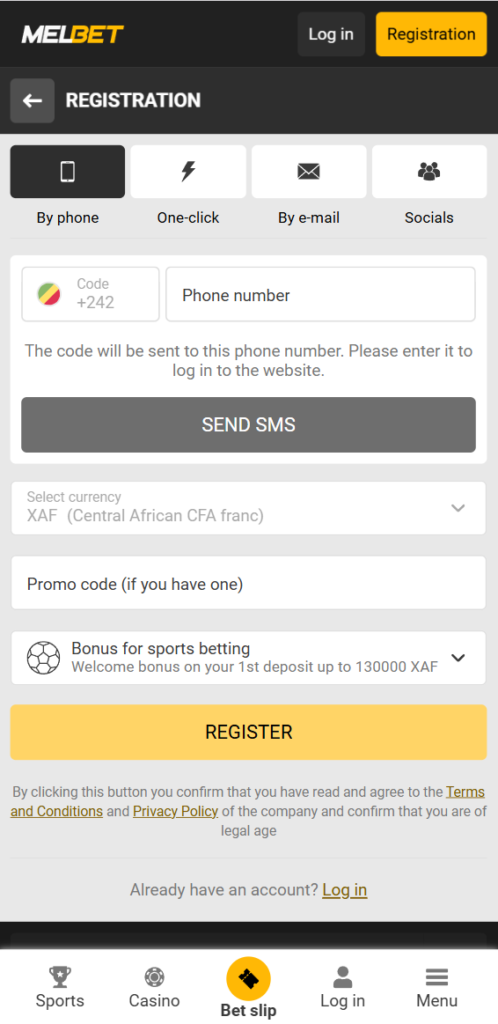
- Open Melbet using the registration button and choose Registration.
- Choose By phone or another method you can access reliably.
- For phone signup, select Zambia (+260) and enter the requested remaining digits.
- Request the SMS and enter the confirmation code.
- Set the currency to ZMW and review the sports or casino offer choice.
- Enter a valid promo code only if you have one you intend to use.
- Review the terms, submit and complete the confirmation.
- Save the account ID and finish the personal profile.
Phone, email, one-click and social signup
Phone and email
Phone signup uses an SMS confirmation. Email signup uses an activation message or link to establish access to the inbox. Keep the registration screen open while completing the confirmation. For email, check the exact spelling and filtered folders before requesting another message.
One-click
Save the ID and password as soon as they appear, then add your own email and phone details to the account. A generated login is useful only if you can find it later. Use your password manager, not a screenshot left in a shared gallery or chat.
Linked social or messenger account
Remember which provider you chose. Opening a different provider on the return visit can lead to the wrong identity or another registration attempt. If you plan to close that social account, resolve your Melbet recovery contact and account-access options first.
📌 Some advice
Check +260 and ZMW yourself. International walkthrough screenshots explain the controls, but their currency, country and promotion are not automatically the Zambia settings.
Solve the specific signup problem
No SMS or activation email
Confirm the destination before resending. Test whether your SIM receives normal messages or whether you can sign in to the email account directly. Wait for the current resend option, then use the message corresponding to the latest request. Repeatedly changing between phone and email signup can make it harder to track which account exists.
My details are already in use
Use login and recovery for an existing account you own. Melbet’s account terms restrict multiple profiles, so a new phone number is not a clean repair for a forgotten account. If the number was recently reassigned to you, explain that to support and ask them to check the ownership record.
Registration completed but I lost the ID
If you are still signed in, open the account menu and save the ID. In the app, look in Menu; on the mobile website, use the user icon. If you have already signed out, try the linked phone or email login route. With neither contact linked, ask support about ownership verification.
I selected the wrong currency or offer
Correct a draft form before submitting it. For a completed account, ask support what can be changed before depositing. Keep the current account ID in the request and avoid opening a second profile. The welcome-offer selection should match the product you intend to use.
Finish the profile before your first withdrawal
Check your name, birth details, country and contact information. If verification is requested, follow the required document type, image quality and submission route. Keep the full document visible when that is requested, with a legible image and consistent details.
If a document is rejected, ask which field, image requirement or ownership check remains unresolved. A targeted correction is more useful than resending the same unreadable picture. Never send account passwords or confirmation codes as verification evidence.
Set up a dependable return login
Keep the account ID in a password manager and confirm the linked recovery contact. If you enable Google Authenticator, understand that its code is an additional login factor. Preserve your recovery arrangements before replacing or wiping the phone. The password and an authenticator code perform different jobs.
Our Melbet login guide explains the return visit, reset process and 2FA issues. Read the Melbet Zambia review for payments and app information, or compare wallet funding in our Airtel Money guide.
Ask the right Melbet team
Melbet’s contact information separates general enquiries, at info-en@melbet.com, from security enquiries, at security@melbet.com. Its listed phone number is +44 20 3807 7601, an international number for Zambia callers. Use the support channel inside the account or official site to confirm the appropriate verification route.
Provide the ID if known, signup method, approximate registration time and exact error. Say which contact methods you can still access. Keep sensitive documents for the authenticated process support directs you to, and retain the conversation reference.
Melbet registration FAQs
💱 Why does an example show a different currency?
Melbet operates across markets. Set the live form to Zambia and ZMW; an international illustration is not confirmation of your account’s settings.
⚡ Is one-click signup enough to recover an account later?
Save the generated credentials and complete your contact details immediately. Recovery depends on what is linked and what ownership evidence support can verify.
📨 What if I cannot access the signup email?
Try another login method already linked to the same account. If none remains, ask support for an ownership-recovery process.
🎁 Do I have to use a tutorial’s promo code?
Use only a valid offer you intend to claim. Check the actual code and bonus choice in your own registration form.