Melbet Zambia Login: Recover Your ID, Reset Passwords & Fix 2FA
Melbet login can use a linked phone, email or account ID, with extra verification when enabled. This guide separates password recovery from lost-authenticator recovery, explains one-click account access and gives a practical sequence for app failures, missing messages and account restrictions.
Select the correct Melbet login option
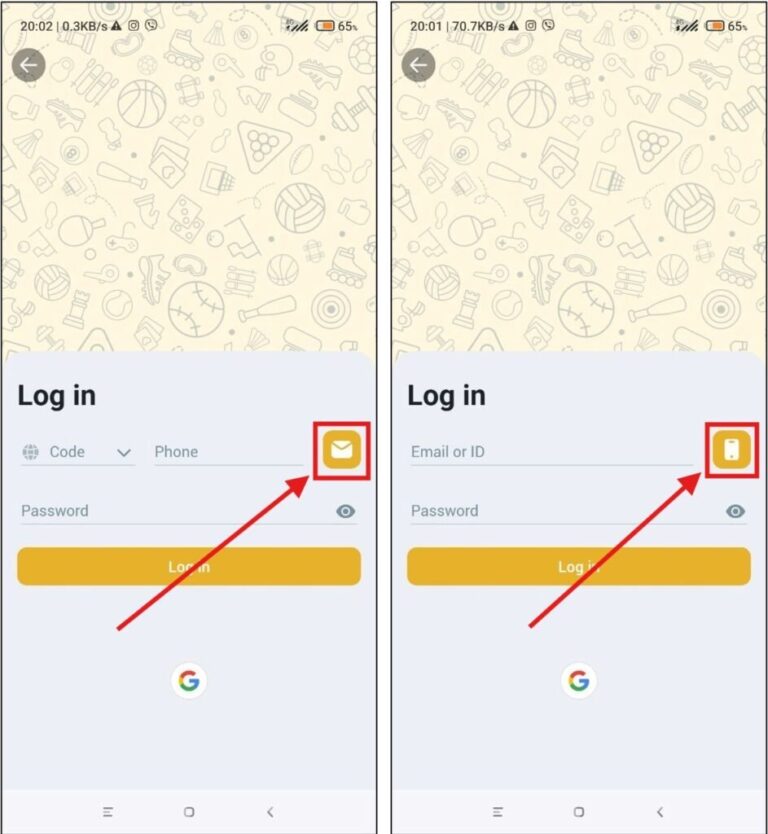
- Open Melbet through the login button or the official app you already use.
- Choose the login method matching your account: phone, email/ID or the linked provider.
- Enter the matching identifier and password.
- Complete any SMS, email or authenticator challenge requested.
- Check the account ID and profile after the account opens.
In the app, the email/phone selector changes which credential the field expects. Choose the route first, then enter the identifier. If using phone login, inspect the country selector; for your Zambia number, use +260 in the way the field requests.
Find the account ID when another session still works
Keep a working session open while gathering recovery details. In the app, open Menu and look at the account information near the top. On the mobile website, use the user icon. Save the ID privately and check the linked recovery contact before signing out.
For a one-click account, the generated credentials and later-linked contact details are particularly important. Try a phone or email route only when that contact was linked to the same account. Another one-click signup creates a different profile and will not recover the previous balance.
Reset a forgotten password
Open Forgot Password on the login form. Use an available linked recovery contact and follow the reset message and screen instructions. Set the new password, return to the correct login method and replace the saved password in your manager or browser.
If autofill keeps supplying the old value, type the new password manually once on your own device. Keep the distinction between the password and an extra verification code clear: a new password may still be followed by a 2FA challenge.
Melbet 2FA: a different problem from a lost password
I still have Google Authenticator
Select the code entry that belongs to this Melbet account. If several similarly named entries exist, check which one was set up for the account you are opening. Enter the current code before it changes. Check your device’s automatic date/time if valid-looking time-based codes repeatedly fail.
I changed or lost the phone
If the authenticator codes were synced to your Google Account, check the app’s recovery/sync state on the new device. If you still have the old device, use the supported code-transfer process before wiping it. Google’s instructions distinguish synced codes from codes stored only on the old device.
If the Melbet code cannot be restored, contact Melbet security/support about resetting the account’s 2FA after ownership checks. Reinstalling the app alone does not recreate a missing authenticator secret. Resetting the betting password alone does not establish that 2FA was removed.
📌 Some advice
Keep a working authenticator until the new device has been tested. Never share its setup QR code, secret key or current codes in a support screenshot.
Reset message missing or code rejected
Check the destination and whether you still control it. Test ordinary SMS or open the inbox directly, then inspect filtered messages. Keep one reset screen open, wait for resend and use the message associated with the current request. If a code is already expiring, wait for a fresh code before a careful attempt.
If no linked contact can be reached, say that clearly in the recovery request. Provide the account ID when known and ask for the official ownership-check route. Do not keep creating profiles or sending deposits while access to the existing account remains uncertain.
App login fails but the browser opens
A working browser session suggests checking the app version, selected account and saved credentials. Update through the official mobile download route. Keep linked contact access before clearing app data or reinstalling, since those actions can remove a locally remembered session.
For a browser-only problem, try a current normal browser outside an in-app window. Check whether cookies, JavaScript or a content blocker are stopping the form. Clear only that site’s stored data if a stale session seems likely, understanding that this signs you out.
Locked account or country-access message
Repeated login attempts can lead to a temporary lock. Stop guessing passwords and follow any wait instruction shown. If the account remains restricted, ask support what account-status or verification action is needed. An ownership review is different from an incorrect-password problem.
If the page says access is unavailable in your country, save the exact message and ask official support about availability for your account and location. A random mirror or copied login page is not a reliable place to enter credentials.
Contact the appropriate Melbet team
The published general contact is info-en@melbet.com, with security@melbet.com for security matters. The listed phone number, +44 20 3807 7601, is an international call from Zambia. Use verified in-site support when available to confirm the right recovery channel.
- Identify the account privately with its ID if known.
- State whether the failure is at password, SMS, email or authenticator confirmation.
- Include the exact error, last successful access and device/app details.
- Say which recovery contacts or old devices you still control.
- Keep the case reference and follow the requested ownership process.
After recovering the account
Check recent activity, linked contacts and your saved password. Read the Melbet registration guide for initial setup or the Zambia review for payments and mobile features. Complete recovery before making a new payment.
Melbet login FAQs
🔐 Will a password reset remove Google Authenticator?
Treat them as separate protections. Restore the authenticator or ask support for a verified 2FA-recovery process.
⚡ I used one-click registration. Which login should I use?
Use the generated ID and password, or a contact method linked later to the same account. Save those details while a session still works.
📱 Does reinstalling the betting app transfer authenticator codes?
No. The authenticator has its own storage, sync and transfer process.
🆔 What should I send security support?
Start with the ID, issue and exact error through verified support. Provide sensitive ownership documents only through the process they confirm; keep passwords and codes private.