How to log in to Moors World of Sport
MWOS, at betting.co.zm, uses your mobile number and password to log in. Here’s how to sign in, reset your password, open an account if you don’t have one, and fix common problems.
How to log in to MWOS
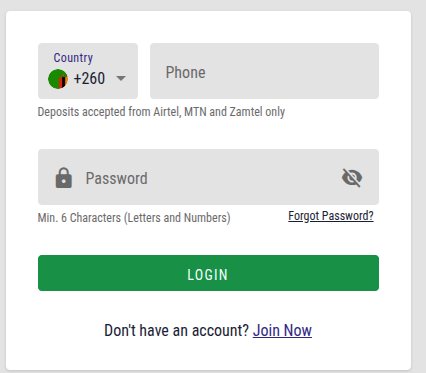
- Go to betting.co.zm or open the MWOS app.
- Tap Login.
- Enter the mobile number you registered with. The +260 code is already shown.
- Enter your password and tap Login.
Resetting a forgotten password
- Tap Login, then the forgotten password link.
- Enter the mobile number on your account.
- Follow the instructions sent to your phone and choose a new password of at least six letters and numbers.
- Log in with the new password.
Don’t have an MWOS account yet?
Registering takes a minute. Tap Register, enter your mobile number, choose a password of at least six letters and numbers, add a promo code if you have one, and confirm you’re 18 or over.
New customers get a 100% match on their first deposit in free bets, up to K5,000. You bet your deposit three times on tickets of three or more selections at 1.3 each and 3.0 in total, within five days, and the most you can win from the free bet is K25,000.
Logging in on the MWOS app
The MWOS app is for Android only and is downloaded as an APK file from MWOS’s site rather than Google Play. You log in with the same number and password as on the website. iPhone users log in on the mobile site at betting.co.zm.
Can’t log in to MWOS?
| Problem | What to do |
|---|---|
| Wrong number or password | Check you’re using your registered number, then reset your password. |
| Reset message doesn’t arrive | Check your signal and the number you entered, wait a few minutes, then try again. |
| Account locked | Contact support, as it may be a security check or a request for ID. |
| Site won’t load | Try the app, another browser or mobile data, and clear your browser cache. |
MWOS support is available on live chat, by phone on +260 971 263 698, on WhatsApp at +260 972 666 021 and by email at support@betting.co.zm.
Once you’re logged in
Deposit with Airtel, MTN or Zamtel from K1 to K20,000, approved with your PIN, and withdraw from K10 to K20,000, confirming with your password. You can also pay in cash at an MWOS shop or with a prepaid voucher.
Keeping your account safe
- Use a password you don’t use for anything else, and never share it or your mobile money PIN.
- Only log in on the bookmaker’s real site or app. Links sent by strangers on WhatsApp or Facebook can lead to fake log-in pages.
- Log out when you use a shared or borrowed phone.
- Set a deposit limit in your account if you want to keep your spending in check. Betting is for adults 18 and over only.
More guides
Frequently asked questions
How do I log in to MWOS?
Go to betting.co.zm or open the MWOS Android app and tap Login. Enter the mobile number you registered with, which already shows the +260 code, then your password, and tap Login. You don’t need a username or email address. If you can’t remember your password, use the reset link on the same screen to set a new one.
How do I reset my MWOS password?
Tap Login and then the forgotten password link, enter the mobile number on your account and follow the instructions sent to your phone. Your new password needs at least six characters, mixing letters and numbers. If no message arrives within a few minutes, check the number you entered and contact MWOS support by live chat or WhatsApp.
Is there an MWOS app for iPhone?
No. MWOS’s app is for Android only and is downloaded as an APK file from its website rather than Google Play. iPhone users log in and bet on the mobile site at betting.co.zm, using the same number and password. Deposits there are approved through the same PIN prompt on your phone, so nothing is missing.
Why is my MWOS account locked?
Accounts are usually locked after too many wrong passwords, or held while MWOS checks your identity or looks into a possible duplicate account. Try resetting your password first. If you still can’t get in, contact support on live chat, by phone on +260 971 263 698 or on WhatsApp, and have your NRC ready.
How do I open an MWOS account?
Tap Register on betting.co.zm, enter your Zambian mobile number, choose a password of at least six letters and numbers and add a promo code if you have one. Confirm you’re 18 or over and you’re done. Your first deposit can earn a 100% free bet up to K5,000 if you meet the wagering terms within five days.