22Bet Zambia Login: Reset Passwords, Fix SMS Delivery & App Update Problems
Use the contact method linked to your 22Bet account to sign in or recover access. This guide covers missing SMS and email codes, a changed number, temporary locks and app updates that remove saved login details. Follow the branch that matches the actual error on your screen.
How to log in to 22Bet
- Open 22Bet through the login button or the official app you already use.
- Select the phone, email/ID or linked-provider option attached to your account.
- Enter the matching identifier and password.
- Complete any additional verification requested.
- Check the account profile and identifier after login.
Use the registered contact, not a new email or the SIM currently providing mobile data. When the form supplies a separate country selector, check +260 and follow its remaining-number example. For linked social access, choose the same provider and identity used for this account.
Reset a forgotten password
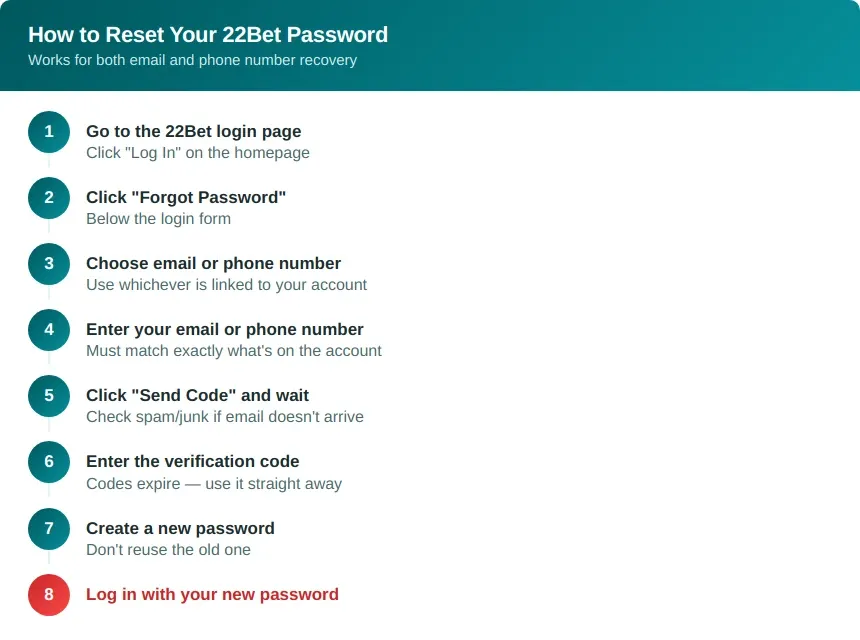
- Choose Forgot Password from the login form.
- Select email or phone recovery and enter the linked contact.
- Request the recovery message.
- Enter the current code in the reset screen.
- Set the new password and return to Login.
- Replace the old saved password on your device.
An alternate recovery method is useful only when it was already linked to the account. A new phone number or inbox cannot receive messages intended for an older registered contact. If both original contacts are inaccessible, ask support for manual ownership recovery.
No reset SMS: test delivery before requesting more codes
Check the destination number, ordinary SMS reception and the active SIM on a dual-SIM phone. Keep the recovery screen open and wait for its resend control. Requesting several codes can leave you trying a message from an earlier attempt.
If the account’s messages still fail while ordinary texts arrive, give support the number format and request time. Ask your network about application or international-message filtering if delivery is identified as the problem. Do not assume that every missing code is a carrier block or that changing the password will fix delivery.
No reset email or an invalid code
Open the linked inbox directly and inspect spam, junk and promotions folders. Check the full email address for an old spelling or a different account. Use the message associated with the current recovery request. A new request can invalidate an earlier code.
If a code is rejected, record the exact wording before requesting another. A code for phone confirmation, password recovery and an authenticator challenge can belong to different screens. Match the code to the action you started.
📌 Some advice
Keep one recovery attempt open. Before asking for another message, check whether the existing form is still waiting for a code or has started a different step.
Login stopped working after an app update
The app no longer remembers the password
An update or reinstall can end the saved session. Enter the existing account’s details manually or use password recovery. The missing saved login is not evidence that your account or bet history was deleted.
The app crashes or stays on loading
On Android, try Settings, Apps, 22Bet, Storage and Clear cache, then reopen the app. Clear cache and Clear storage/data are different actions: the latter can remove local settings and a remembered session. Preserve recovery access before taking a step that signs you out.
Compare with a login in a current browser. If the website works, check the app version and update using the operator’s official mobile download route. Record the version number when reporting a repeated crash. Before uninstalling, make sure you know the account credentials and can reach any linked verification method.
A new SMS challenge appears
Complete the challenge using the linked contact. An expired session can require a fresh confirmation even if the app previously opened without it. If that number has changed, follow ownership recovery instead of repeatedly requesting codes to an inactive SIM.
Changed number or lost phone
If the phone number is no longer yours, ask support to verify ownership before updating it. Keep the account identifier, original registration details and any case reference available privately. If the phone was stolen, report possible account exposure promptly through official support.
Do not delete an authenticator app to repair a betting-app problem. A separate 2FA setup needs its own recovery or transfer process. A password reset and an authenticator reset are different account actions.
Temporarily locked or verification required
Stop repeating failed logins when the page shows a lock or wait instruction. Follow the timer or advice displayed, then use recovery if the password is uncertain. Avoid treating a quoted lock duration from a tutorial as a guarantee for your account.
For an ongoing restriction, ask which ownership or verification requirement remains. A successful password change does not itself clear a separate account-status restriction. Keep communication in one case and correct the specific document problem support identifies.
Contact the right 22Bet team
General and technical support uses support-en@22bet.com or in-site chat. The published security contact is security@22bet.com. Start with the account identifier if known, exact error, last successful access, device/app version and the recovery methods that still work. Keep passwords, OTPs and full payment details out of ordinary error screenshots.
Use the 22Bet registration guide for first-time setup. The main Zambia review covers account features, and our account-access overview explains the wider process.
22Bet login FAQs
🔄 Did an app reinstall delete my account?
Use the existing login. A reinstall can remove local session data without creating or deleting the server-side betting account.
📨 Can I reset using a different inbox?
Use a contact already linked to the account. Ask support for ownership recovery if no linked contact remains accessible.
⏳ Should I keep trying during a login lock?
Follow the wait instruction on the screen. Repeated failed attempts can prolong the problem.
🧹 Is Clear cache the same as Clear data?
No. Clear data/storage can remove local settings and remembered login information. Preserve recovery access first.